Case study
Wireless Bridge Between Buildings: How to Connect a Second Site Without Trenching
There is a second building on the property, a workshop across the yard, or a pole in the parking lot, and it needs to be on the network. Almost everyone assumes the answer involves digging a trench. Usually it does not. Here is how a wireless bridge works, two real projects at 3,000 feet and 500 feet, and the one requirement you cannot design around.
7 min read
read
·


There is a conversation we have with business owners more often than you would think. It goes something like this: there is a second building on the property, or a workshop across the yard, or a pole in the parking lot, or a warehouse on the far side of the lot. It needs to be on the network. And everyone has already concluded, before we arrive, that the answer involves digging.
Usually it does not.
Why Everyone Assumes You Have to Dig
The instinctive answer to "how do I get the network over there" is to run a cable. That is how networks work inside a building, so it feels like it should be how they work outside one too.
But outside changes everything. Copper will not carry Ethernet reliably past about 100 meters, roughly 328 feet, so anything beyond that means fiber. And fiber across open ground has to go somewhere: buried in a trench, or strung overhead on poles you may not own.
Trenching is not one job. It is excavation, conduit, the fiber itself, splicing and termination at both ends, and then putting the ground back the way you found it. If the route crosses a driveway, a road, a parking surface, or anything a utility already occupies, add permits and coordination on top. At a few hundred feet that is expensive. At half a mile, it stops being a line item on an IT budget and becomes a capital project with a timeline measured in weeks.
And after all of that, what you have bought is one link between two points.
What a Wireless Bridge Actually Is
A wireless bridge is a pair of radios, one at each end, pointed directly at each other. They are not Wi-Fi in the way you think of Wi-Fi. They do not broadcast in all directions hoping a laptop finds them. They are narrow, focused, and aimed, more like a searchlight than a lamp, and that focus is what lets them carry a network link across distances that would be absurd for an ordinary access point.
To the network, the result is simply a cable. Whatever is plugged in on the far side behaves as though it is wired back to your switch, because as far as the network is concerned, it is.
There are two shapes this takes:
Point-to-point. One radio here, one radio there. The simplest version, and the right answer when you have exactly two locations to join.
Point-to-multipoint. One base station on the main building, several remote radios all aimed back at it. This is the better design when three or four places need connectivity, because you are not building three separate links. You are building one hub and hanging spokes off it.
A Site With Three Remote Points, the Farthest Half a Mile Away
On one project, a client had several areas of a large site that needed to be on the network with no cable anywhere near them. One was a pole in the parking lot that needed to provide Wi-Fi. The distances were not trivial: roughly 3,000 feet, 2,700 feet, and 2,500 feet from the main building.
Three thousand feet is more than half a mile. Trenching fiber that far, three separate times, was never going to be a proportionate answer to the problem.
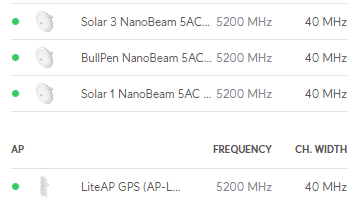
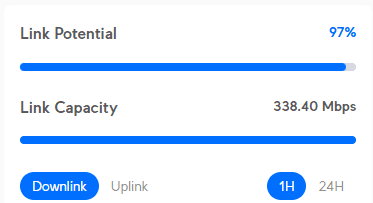
What we built instead was a point-to-multipoint design: a Ubiquiti LiteAP GPS base station mounted on the building, with three NanoBeam radios at the remote points, each aimed back at it. Every link carries roughly 300 Mbps, considerably more than any of those locations actually needed.
Line of sight was clear across all three paths. The links went in without a shovel touching the ground.
That project also included a full network closet rebuild and a Wi-Fi 2 to Wi-Fi 6 upgrade. The complete case study is here.
And a Much Smaller One: Two Radios, 500 Feet
Not every bridge is a half-mile shot. On another project the requirement was simply to join two points about 500 feet apart. That got a pair of NanoBeam 5AC radios, one at each end, pointed at each other. Nothing else.
We mention it because 500 feet is the far more common version of this problem, and because it is exactly the distance at which people still assume they need to dig. Copper will not reach it. Fiber will, if you are willing to open the ground. Two radios and clear line of sight will also reach it, in an afternoon, for a fraction of the money.
What a Wireless Bridge Needs to Work
Line of sight. This is the one that is not negotiable. The two ends have to be able to see each other. Not approximately. A building in the path, a stand of trees, a rise in the ground, and the link either performs badly or never comes up at all. Everything else on this list is engineering. This one is physics.
Power at both ends. The radio on the far side needs electricity. This is the constraint people forget, and it is occasionally the thing that kills an otherwise perfect plan.
Something solid to mount to. A wall, a mast, a pole. It has to be rigid, because a radio that moves in the wind is a link that drops in the wind.
Proper alignment. At 3,000 feet, a radio a couple of degrees off is aiming at nothing. Alignment is not a matter of pointing it roughly the right way and hoping. Each end is sighted and tuned against the other until the link is genuinely strong, not merely present.
When a Bridge Is Not the Right Answer
We would rather tell you this now than have you find out later.
If there is no line of sight, there is no bridge. Sometimes you solve it by going higher: a taller mast at one end, or a relay point that can see both. Sometimes you cannot, and then the honest answer is fiber, and we will say so.
Foliage is seasonal, and trees grow. A path that is clear in February can be obstructed in July. A path that is clear this year may not be in five. That belongs in the design conversation, not in a support ticket two summers from now.
If you need multi-gigabit, fiber is fiber. A bridge carrying a few hundred megabits is plenty for a remote building, cameras, access points, and a handful of users. It is not the answer if you are moving enormous volumes of data between two sites.
It is a radio link, and radio links live outdoors. Properly designed and properly aligned they are reliable, and we have ones that have run for years. But anyone telling you a wireless link and a buried fiber are identical in every respect is selling you something.
The Point
Distance is not the obstacle most people assume it is. Business owners look across a property at a building, a yard, or a pole and conclude that connecting it is a construction project. Most of the time, if you can see from one end to the other, it is not.
This is enterprise networking work, and it is one of the more satisfying parts of the job, because the gap between what the client expected to pay and what it actually costs is usually enormous.
Frequently Asked Questions
How far can a wireless bridge actually go? Further than most people expect. We have links running at 3,000 feet, more than half a mile, carrying around 300 Mbps each. The practical limit is usually line of sight and what you can mount the radios to, not the radios themselves.
Do I need line of sight between the two buildings? Yes. This is the one requirement you cannot design around. If a building, a hill, or a stand of trees sits in the path, the link will either underperform or fail to come up. Sometimes going higher solves it. Sometimes it does not, and fiber is the honest answer.
How fast is a wireless bridge? Our links typically run around 300 Mbps, well beyond what a remote building, a camera system, or an outdoor access point actually needs. If you need multi-gigabit throughput between sites, fiber is still the right tool.
Is a wireless bridge cheaper than trenching fiber? Almost always, and the gap widens with distance. Trenching means excavation, conduit, fiber, splicing, and restoration, plus permits if the route crosses a road or a utility. A bridge is two radios, two mounts, and an afternoon of alignment.
Is it secure? The link is encrypted and carries traffic the same way a cable would. It should be segmented with VLANs like any other part of your network, particularly if what sits on the far end is cameras or building systems.
What happens in bad weather? A properly designed and correctly aligned link is stable through normal weather. The failure we actually see is not rain. It is a radio that was never aligned properly to begin with, or one mounted to something that moves in the wind.
Can you connect more than two locations? Yes. That is the point-to-multipoint design described above: one base station on the main building, several remote radios aimed back at it. It is a better answer than building separate links when you have three or four places to reach.